
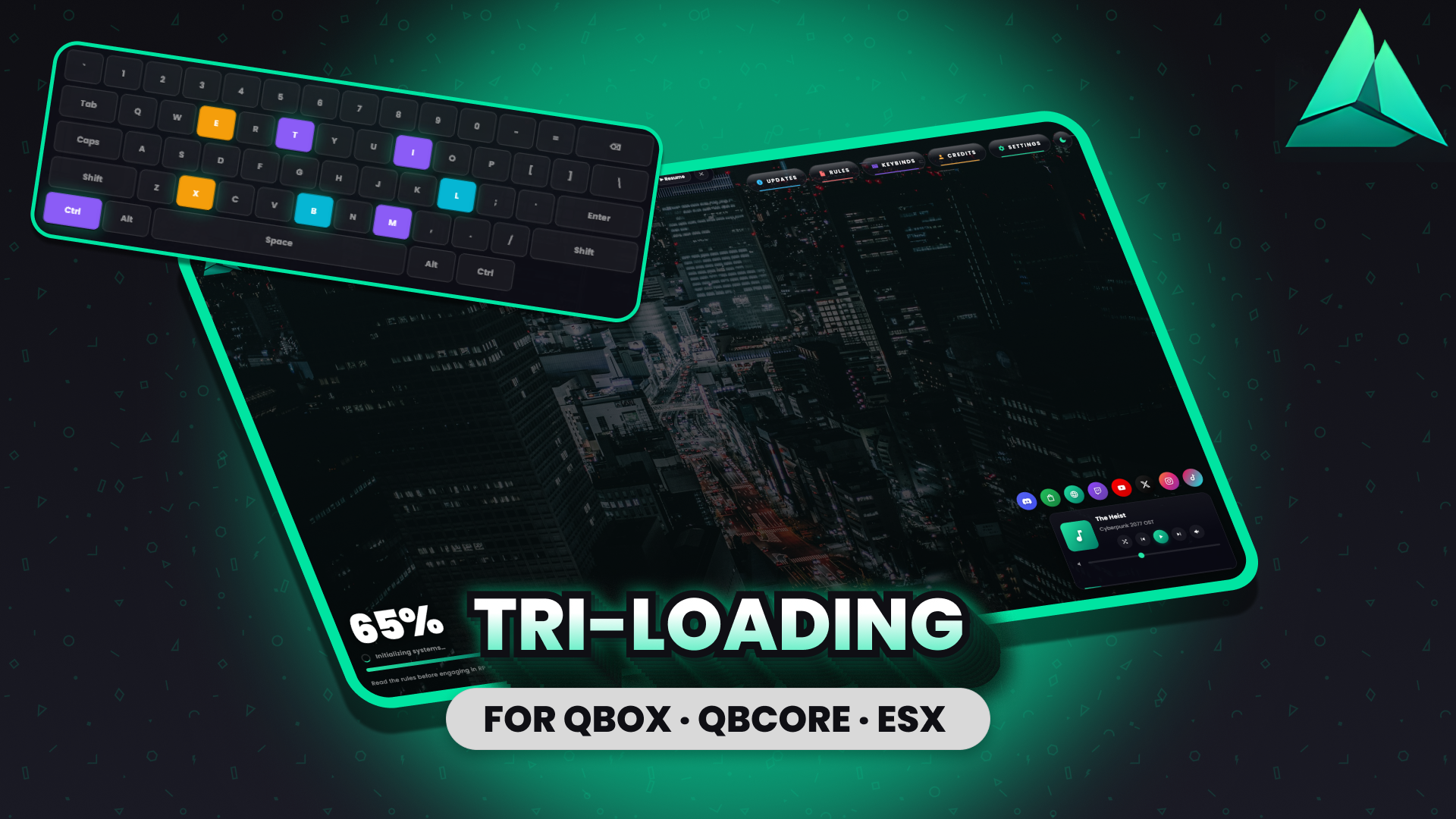
🎮 TRI-LOADING
A premium FiveM loading screen — dark glass shell, music widget, live theme toggle, and a category-coloured info hub.
The loading screen the rest of your server lives up to
Most FiveM loading screens are a placeholder — a logo, a progress bar, a tip. tri-loading is the first impression your server makes, treated with the same polish you put into the gameplay behind it. Photo or video background, dark glass shell that sits cleanly over either, and five info modals that load lazily so the boot stays fast.
✨ What makes it different
🎥 Photo or video background — one config flag switches — Drop a still image for a clean cinematic feel, or point at an .mp4 / .webm for ambient looping motion. The dark glass UI sits over either equally well. Flip Config.Branding.useVideo: true and the resource pulls from bgVideoUrl instead of bgImageUrl.
🎵 Music widget with shuffle, crossfade, and keyboard shortcuts — Fisher-Yates shuffle pins the current track so the queue doesn't jump. ~400ms crossfade between tracks. M mutes, ← and → skip, all suppressed when a modal is open.
🌓 Live light/dark theme toggle — Sun/moon button in the top nav swaps body.theme-light on the fly. Shell text (server name, progress numeral) stays white in both themes because it sits over the photo; only the cards flip. Config.UI.theme lets you ship in light mode by default.
⌨️ 3D SVG keyboard on the Keybinds panel — Two-layer drop shadow (hard offset + soft ambient blur). Hover lifts the key group. :active presses it down. Bound keys idle-pulse. Per-binding category field colours the matching key on the keyboard.
🎨 Category colours run through every panel — Updates new / improvements / fixes lists carry their tone colour through the left strip and bullet glow. Rules show severity chips alongside colour tags. Keybinds category dots in the sidebar. Credits cards carry the group gradient through left strip, bg wash, role tag, and avatar glow. Settings rows are themed per-control (Music teal, Volume blue, Tips orange, Shuffle purple).
🏗️ Multi-framework shutdown — Listens for playerSpawned, QBCore:Client:OnPlayerLoaded, esx:playerLoaded, qbx_core:client:playerLoaded. 60-second safety-net fallback if none fire. Works under QBox · QBCore · ESX · standalone.
⚙️ Everything is config-driven
-
✅ Server name and logo URL
-
✅ Background image OR video — one config flag switches
-
✅ Theme default (
darkorlight) -
✅ Accent gradient start / end (mint by default — change to any palette)
-
✅ Tips carousel content and interval
-
✅ Social anchor (bottom-left or bottom-right)
-
✅ Credit group gradients (Founders / Developers / Designers each get their own start + end colours)
-
✅ Full music playlist with per-track title and artist
-
✅ Default volume
-
✅ Full Updates / Rules / Keybinds / Credits content
-
✅ 8 social URLs (set any to empty string to hide)
config.lua ships at the resource root for documentation. The HTML side reads html/config.js at boot — that's the file you actually edit. Both are unencrypted under escrow_ignore so you can customize without touching the encrypted bundle.
🚀 Performance
-
Vanilla HTML / CSS / JS — no frameworks, no build step, no bundler
-
No
backdrop-filter— FiveM CEF rule respected -
No
localStorage/sessionStorage— CEF unreliable; all preferences are buyer-set in config -
No external CDN beyond Google Fonts (Poppins 400–900)
-
All icons inline SVG — no Font Awesome / Lucide / icon fonts
-
Modals lazy-render on first open — boot stays light; you only pay for the panels that actually get clicked
-
No
requestAnimationFrameloops — all motion is CSS keyframes -
Progress bar updates only on
LOAD_PROGRESSNUI events — never polled
🎁 What you're getting
-
✅ Full source you can drop into your server resources folder
-
✅
config.js(runtime) +config.lua(mirror for documentation) — both unencrypted viaescrow_ignore -
✅ Pre-loaded with placeholder content so it runs on first boot — replace with your own
-
✅ 3 royalty-free placeholder music tracks (Cyberpunk 2077 OST · Halo OST · Mikel Zelda & Chill — replace with your own licensed audio for production)
-
✅ Multi-framework client shutdown handler — works under QBox · QBCore · ESX · standalone, no config needed
-
✅ This changelog, kept current with every patch
🔧 Requirements
-
Framework: Standalone — runs before QBox / QBCore / ESX boot. No framework dependency.
-
Dependencies: None
-
FiveM version: Cerulean (FXServer build 6116+)
-
Browser: FiveM CEF (Chromium-based, what your server already uses)
💬 Support
Join the Tri Studios Discord for setup help, feature requests, and patch notifications. Escrow buyers get priority response in our support channel.
🔓 Need source access?
If you want to fork, modify, or extend the resource — building on top of the loading screen rather than just configuring it — grab the \ at £16. Same product, every feature included; you also get full source access (no escrow encryption) under our no-resale community license.
Standard edition (this one) is the right pick if:
-
✅ You just want to install it, swap a logo and a config value or two, and forget
-
✅ You don't plan to modify the source code
Source Edition is the right pick if:
-
✅ You're a developer / agency / studio who wants to fork and extend
-
✅ You want to learn from the source as a reference implementation
-
✅ You're building derivative loading screens for client servers
Same code, same features, same support. Source Edition just exposes the code for buyers who actually benefit from that.